
Network selection tree
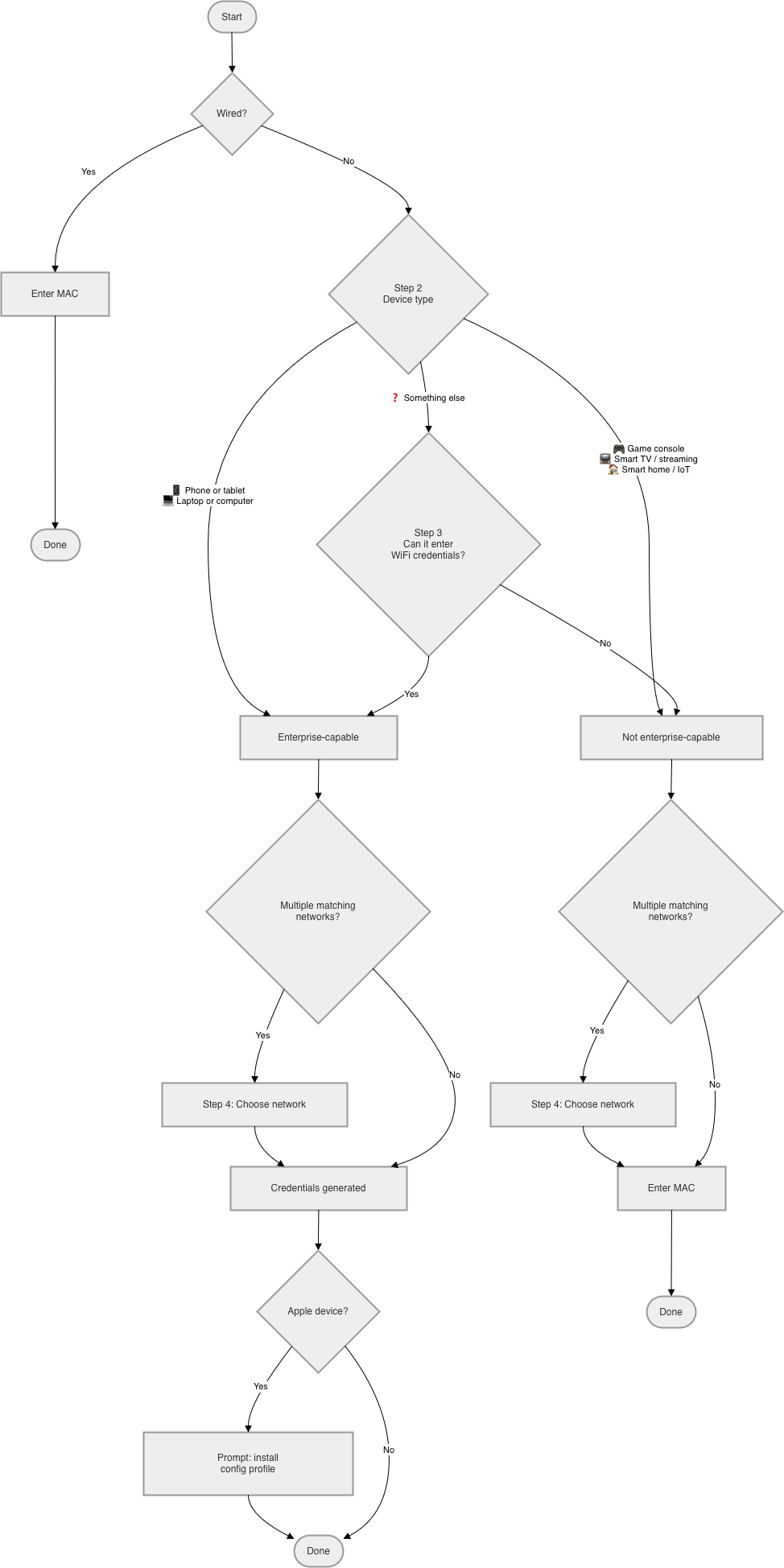
Step 1: Wired?
- Yes → Enter MAC → Done
- No → Step 2
Step 2: Device type
- Phone or tablet (iPhone, iPad, Android) → enterprise-capable
- Laptop or computer (Mac, Windows, Linux) → enterprise-capable
- Game console (PlayStation, Xbox, Nintendo Switch, …) → not enterprise-capable
- Smart TV or streaming device (Roku, Fire Stick, Apple TV, …) → not enterprise-capable
- Smart home / IoT (speakers, bulbs, sensors, …) → not enterprise-capable
- Something else → Step 3
Step 3: Can it enter a WiFi username and password? (only for "something else")
- Yes → enterprise-capable
- No → not enterprise-capable
Step 4: Which network? (only if multiple networks match the capability bucket)
Present all matching networks by label + icon for user to select.
Enterprise-capable outcome
- Credentials generated
- Apple device → prompt: install config profile
- Done
Not enterprise-capable outcome
- Enter MAC → Done